In this tutorial we will study the basic commands of UNIX and some basic concepts of UNIX. Let us start this tutorial from the basic concept of kernel.
What is kernel??
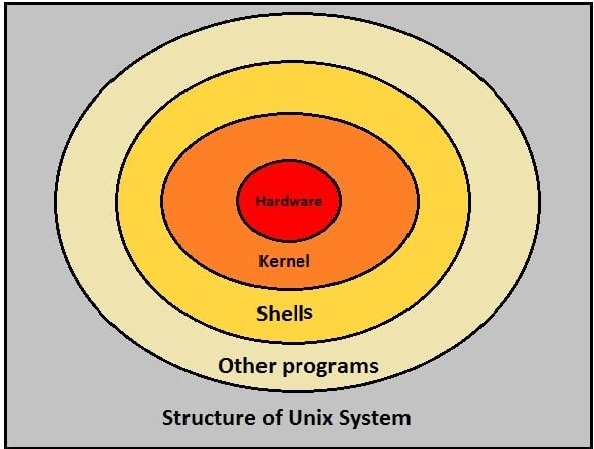
Kernel is the heart of operating system which interacts with the hardware. Kernel can also be used in some of the basic task like memory management but its main task is to interact with hardware.
Next concept is Shell- When you type some command on terminal, shell translates the command and calls the necessary program for that command.
Another important concept in Unix is the Directory
Directory– In Unix the directories/files are arranged in hierarchical fashion. Directory in Unix can be used for storing another directory and files. Directory always begins with ‘/’
Now let us start with some basic command such as creating file, deleting file or renaming file in Unix.
1) Creating file– File can be created using vi command. vi and file name which the user want to give for creating a file is used.
Syntax:
vi file_name
example:
vi myfile
2) Editing a file– This command is same as that of creating a file. vi and the file which user want to edit is written in file name
Syntax:
vi file_name
example:
vi myfile
3) Display content of file- To display contents of file ‘cat’ keyword is used. ‘cat’ followed by the name of the file.
Syntax:
cat file_name
example:
cat myfile
By using this command all contents in the file will be displayed.
4) Copying files- To copy file from source location to destination. Souce file name and destination file name needs to be specified in this command.
Syntax:
cp source_file destination_file
example:
cp myfile otherfile
Note:- cp-stands for copy
5) Renaming files- mv keyword is used to rename a file. Old file name and new file name needs to be specified. mv stands for move.
Syntax:
mv source_file destination_file
example:
mv myfile newfile
6) Deleting file/Removing file- rm keyword is used to remove file. We can delete/remove multiple file by specifying ‘rm’ keyword followed my multiple files which you want to remove.
Syntax:
For removing single file
rm filename
For removing multiple files
rm filename1 filename2 filename3
example:
Example of removing single file
rm myfile
Example of removing single file
rm myfile1 myfile2
These are the basic command for creating, editing, deleting files.
Creating, removing directories and many more will be covered in the second tutorial.